Claude, ChatGPT Desktop, and Local AI Apps: A Storage Comparison
It's easy to see "AI apps are filling up my disk" and assume every AI app on your Mac is equally guilty — the Claude desktop app, ChatGPT's desktop app, and something like Ollama all get filed under the same complaint. They shouldn't be. Claude and ChatGPT desktop are, at their core, chat clients for a cloud service: the model doing the actual thinking runs on Anthropic's or OpenAI's servers, not on your Mac. Ollama, LM Studio, and similar tools run the model locally, which means the weights themselves — often tens of gigabytes — live on your drive.
Conflating the two leads people to go looking for hundreds of gigabytes inside a chat app that was never going to have them, while the actual local model store sits untouched. Here's what each category really uses, checked directly rather than assumed.
The comparison
Typical local footprints after normal use, checked directly under `~/Library/Application Support` and `~/Library/Caches`:
- Claude desktop — roughly 100-300MB — Electron app cache, conversation history cache, and logs under `~/Library/Application Support/Claude`; inference is cloud-side, so there are no model weights to store.
- ChatGPT desktop — roughly 100-400MB — comparable structure under `~/Library/Application Support/com.openai.chat`, plus a separate cache for the optional voice mode and any uploaded file previews; also purely a client for OpenAI's cloud models.
- Ollama — anywhere from a few GB to 200GB+ — entirely dependent on how many models you've pulled into `~/.ollama/models`; this is where actual multi-gigabyte model weights live on disk.
- LM Studio — same range as Ollama, a few GB to well over 100GB — GGUF model files under its configured models directory, plus a smaller app cache comparable in size to Claude or ChatGPT desktop's own footprint.
- GPT4All / Jan — small app footprint similar to Claude/ChatGPT desktop, plus whatever local models you've downloaded through their built-in model browsers, which behave like a smaller-scale Ollama in terms of storage.
Why the cloud chat apps stay small
Claude desktop and ChatGPT desktop don't need to store a model because they're not running one — every message you send goes to a server, and what comes back is text. What they do store locally is a cache of your conversation history for fast loading, some Electron framework overhead common to any app built that way, and application logs. None of that scales with model size, because there's no local model in the picture at all. It's reasonable for either app's footprint to grow slowly over months of heavy daily use, but it's not the kind of growth that reaches tens of gigabytes on its own.
Digging a level deeper: Claude desktop's Application Support folder typically breaks down into a handful of predictable pieces — a local cache of recent conversation content for instant loading when you reopen the app, standard Chromium/Electron caches (GPUCache, Code Cache, and similar folders that any Electron app generates), and rotating log files that get truncated or replaced rather than growing indefinitely. ChatGPT desktop follows a similar pattern, with the addition of a cache specifically for its voice mode feature and thumbnail previews of any files you've uploaded into a conversation — that last piece is the one most likely to grow noticeably if you regularly attach large PDFs or images, since previews are cached even though the actual processing happens server-side.
Why local runners are a genuinely different category
Ollama and LM Studio exist specifically to run inference on your own hardware, and that requires having the actual model weights present on disk — there's no way around this cost, since the alternative to storing the weights locally is not running the model locally at all. A single 8B model at 4-bit quantization is around 5GB; someone who's tried a handful of models across a few families over time can easily be storing 60-150GB in a models directory that isn't visible unless you go looking for it. This is a real, structural difference from a chat app's cache, not just a matter of degree.
To make the scale difference concrete: it would take roughly 300-1000 months of normal Claude or ChatGPT desktop usage, at the growth rates typical for app cache and conversation history, to accumulate the same disk footprint that a single Ollama session pulling three or four mid-size models produces in an afternoon. These aren't the same category of storage cost scaled differently — they're different kinds of storage entirely, one bounded by how much text you've exchanged, the other by how many multi-gigabyte files you've chosen to download.
A worked example: a nearly-full 512GB Mac
Consider a common real scenario: a developer with a 512GB MacBook down to 15GB free, running Claude desktop and ChatGPT desktop daily for months, plus Ollama for local experimentation over the same period. Auditing the chat apps turns up about 250MB for Claude and 350MB for ChatGPT — together, well under a gigabyte, and not a meaningful contributor to the problem. Auditing `~/.ollama/models`, on the other hand, turns up eleven pulled model tags going back several months, several of them duplicates at different quantizations of models the developer no longer actively uses, totaling 94GB. In this scenario — which is genuinely typical, not exaggerated — over 99% of the AI-related disk usage traces to the local model store, and none of it to the two chat apps that get blamed first because they're the ones visibly running in the dock every day.
GPT4All and Jan sit in an interesting middle ground
GPT4All and Jan are worth a specific mention because they blur the line drawn above: both are, at heart, chat-app interfaces with the same kind of small conversation-history footprint as Claude or ChatGPT desktop, but both also bundle an integrated model browser that lets you download and run GGUF models directly, the same category of file Ollama and LM Studio manage. That means the app itself doesn't cause bloat, but it makes it easy to accidentally build up an Ollama-scale model collection without realizing you've effectively installed a second local model runner. Checking a GPT4All or Jan install means checking two things separately — its own small Application Support footprint for the chat interface, and its configured models directory, which behaves exactly like `~/.ollama/models` in terms of how quickly it can grow.
This is also where LocalDocs-style document indexing (covered in more depth elsewhere on this topic) adds a third category on top of the app cache and the model files — an app that looks like a lightweight chat client on the surface can be quietly running all three storage categories at once if you've enabled its model browser and its document-chat feature.
Checking your own setup
A few commands to see exactly where you stand:
- `du -sh ~/Library/Application\ Support/Claude` and `du -sh ~/Library/Application\ Support/com.openai.chat` — actual footprint of each desktop chat app.
- `du -sh ~/.ollama/models` — total size of every model Ollama has pulled.
- `du -sh ~/.cache/lm-studio/models` (or your configured LM Studio models directory) — same check for LM Studio.
- `ollama list` — a quick readable breakdown of exactly which model tags are contributing to that Ollama total.
- `du -sh ~/Library/Application\ Support/GPT4All` and its configured models folder separately — GPT4All's own footprint versus any models you've downloaded through it are two different numbers worth checking individually.
- `rm -rf ~/Library/Caches/Claude` or the equivalent for ChatGPT — safe to clear if either app's cache folder has grown larger than expected; it will simply be rebuilt on next launch.
Where to actually spend cleanup effort
If your Mac is genuinely low on space and you're running Claude or ChatGPT desktop alongside Ollama or LM Studio, the local model store is almost certainly where the space actually went — not the chat apps. That's also the harder thing to audit by hand, since it means comparing model tags and quantizations across tools rather than clearing one obvious cache folder, and it's easy to keep a model around simply because deleting it feels like it might be needed again rather than because it's actually in use.
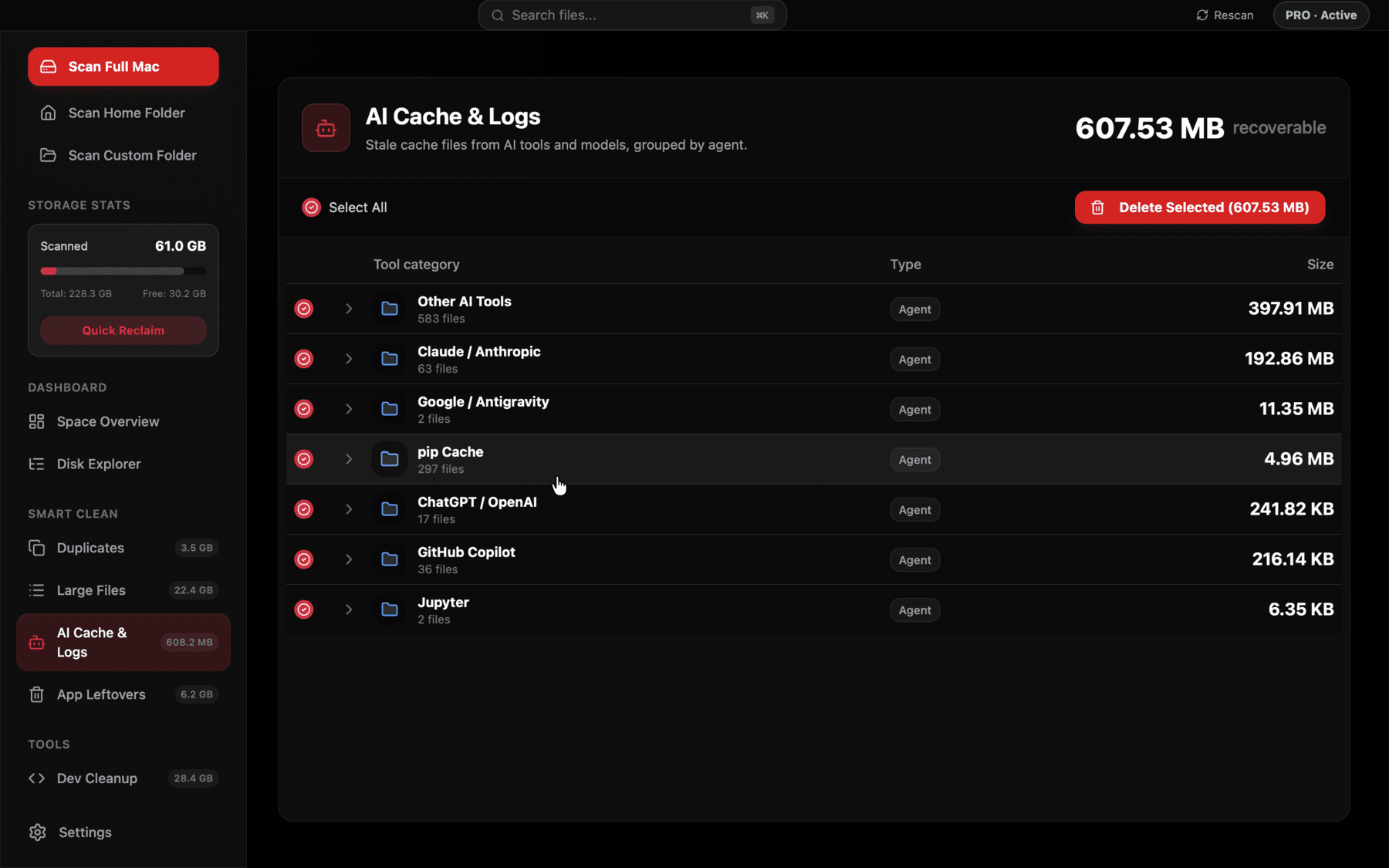
Reclaim's AI Cache & Logs view lists Claude desktop, ChatGPT desktop, Ollama, and LM Studio separately with their real measured sizes, so it's clear at a glance which one is actually responsible for the space.
The honest bottom line
Claude desktop and ChatGPT desktop are not the source of large AI-related disk bloat on a normal Mac — they were never designed to store what a local model runner stores. If you're chasing tens or hundreds of gigabytes, look at Ollama's and LM Studio's model directories first; that's where the actual weight is, in every sense. Clearing a chat app's cache folder is a fine, harmless five-minute task, but it isn't the fix if the real number you're chasing is measured in tens of gigabytes rather than hundreds of megabytes.
It's also worth resisting the instinct to treat this as a reason to distrust cloud chat apps generally — the small footprint isn't a limitation, it's simply what a thin client for a remote model looks like on disk, the same way a web-based email client doesn't store your entire mailbox locally. The two categories exist for genuinely different reasons: cloud chat apps trade local storage for needing a network connection and sending your prompts to a server, while local runners trade a large one-time and ongoing disk cost for offline use and full control over what happens to your data. Neither is a strictly better tradeoff — it depends on what you actually need, and knowing the real numbers on both sides makes that a more informed decision than assuming either category is quietly hoarding space it isn't.
Frequently asked questions
Does the Claude desktop app store AI models on my Mac?
No — it's a client for Anthropic's cloud models, so there are no local model weights, only a small app cache and conversation history.
Why is Ollama using 80GB of disk space when ChatGPT desktop only uses a few hundred MB?
ChatGPT desktop sends your messages to a cloud model and stores nothing but a cache; Ollama runs models on your own machine, which requires the full model weight files to be present on disk.
Is it safe to delete the Claude or ChatGPT desktop app cache?
Yes — clearing `~/Library/Caches/Claude` or the ChatGPT equivalent just forces the app to rebuild its cache on next launch, and won't remove your account or conversation history stored server-side.
Which uses more disk space, LM Studio or Ollama?
Neither inherently — both store the same kind of GGUF model files, so their footprint depends entirely on how many models you've downloaded through each, not on the tool itself.
If I only use Claude and ChatGPT desktop apps, do I need to worry about AI storage bloat at all?
Much less than someone also running local models — expect tens to a few hundred MB total between the two apps, nowhere near the scale that local model runners can reach.
Why does ChatGPT desktop's cache grow faster than Claude desktop's for me?
It's usually attachments — ChatGPT desktop caches thumbnail previews of uploaded files and voice mode audio data locally, so heavy use of those features grows its cache faster than plain text conversation ever would.
See exactly what’s using your disk space.