Rust's target/ Folder: Why Your Cargo Projects Are Silently Massive
You run cargo build on a fresh project and it feels harmless — a few hundred megabytes, gone the moment you forget about it. Six months and a few dozen commits later, that same project's target/ folder is 11GB, and you've got nine other Rust projects on the same machine quietly doing the same thing.
Run du -sh target/ inside almost any Rust project you've touched more than casually and the number is usually bigger than expected. That's not a fluke of one badly behaved crate — it's how Cargo's build model works by default, and understanding why makes it obvious what's safe to delete and what to leave alone.
This is worth understanding in some depth rather than just running cargo clean on faith, because target/ behaves differently from build output in most other languages, and a few of the reasons it grows the way it does also explain why it's completely fine to delete without a second thought.
What's actually inside target/
Cargo compiles everything from source, every time, for every project independently. Unlike ecosystems that ship precompiled binaries for common dependencies, Rust builds each dependency's code specifically for your project's configuration, target architecture, and enabled features. That output all lands in target/, organized by build profile.
This is a deliberate tradeoff, not an oversight. Compiling from source per-project means Cargo can apply exactly the optimization flags, target CPU features, and feature flags your project asked for, which is a big part of why Rust binaries perform well. The cost of that flexibility is that nothing about a dependency's compiled output is shared or reused across unrelated projects the way, say, a system package manager's shared libraries would be.
- target/debug — unoptimized builds with full debug symbols, created by plain cargo build or cargo run.
- target/release — optimized builds from cargo build --release, usually smaller per-binary but still holds a full compiled dependency tree.
- target/debug/deps and target/release/deps — compiled object files for every dependency, often the single largest contributor.
- target/debug/incremental — Rust's incremental compilation cache, meant to speed up rebuilds by reusing partial compilation state.
- target/.fingerprint — bookkeeping files Cargo uses to decide what needs recompiling.
Why it grows faster than you'd expect
A few things about Rust's compilation model make target/ balloon in ways that surprise people coming from other languages. Debug builds keep full DWARF debug information, which can make debug binaries several times larger than their release counterparts. Rust also monomorphizes generic code — meaning a generic function gets a separate compiled copy for every concrete type it's used with, which inflates binary size in exchange for runtime speed.
On top of that, Cargo doesn't aggressively garbage-collect old artifacts. Bump a dependency version, and the old compiled version often just sits in target/debug/deps alongside the new one until something clears it out. Multiply that across a project's lifetime and a workspace with several crates, and it's easy to end up with a target/ folder several times the size of the project's actual source code.
Switching between debug and release builds compounds this further, since each profile keeps its own fully separate copy of every compiled dependency — building both at different points in a project's life effectively doubles the dependency compilation cost sitting on disk. Toggling feature flags on and off between builds has a similar effect: Cargo treats a different feature combination as a different build to cache, rather than reusing what it can.
Finding every target folder on your disk
Because each Rust project keeps its own target/ folder, the total cost is spread across every crate you've ever built, not just your active one. The fastest way to see the whole picture is a single find command that stops descending as soon as it hits a target directory, so it doesn't waste time crawling through the very folders you're trying to size up:
find ~ -name target -type d -prune -exec du -sh {} \; 2>/dev/null
That prints one line per target/ folder found anywhere under your home directory, with its size. If you want them sorted biggest first, pipe the output through sort -rh once it's collected, or just scan the list — it usually only takes one pass to spot the two or three projects responsible for most of the space.
Cleaning it up with cargo clean
Inside any given project, cargo clean removes the entire target/ directory for that crate. The next cargo build or cargo run regenerates exactly what's needed — nothing is lost, it just costs you a full rebuild, which for a large dependency tree can take a few minutes.
You don't have to nuke everything at once. cargo clean --release only removes release artifacts, cargo clean --doc removes generated documentation, and cargo clean -p <package-name> removes build output for one specific dependency rather than the whole tree. For a more surgical option, the third-party cargo-sweep tool (cargo install cargo-sweep) can remove build artifacts older than a certain number of days, which is useful if you have a handful of projects you touch on rotation and don't want to fully rebuild each one.
If you build the same project repeatedly across a team or across machines, it's also worth knowing about sccache, a compiler cache that sits in front of rustc and reuses compiled output across builds and even across projects that share dependency versions. It doesn't shrink an existing target/ folder, but it can meaningfully reduce how much gets recompiled from scratch after a cargo clean, which changes the calculus on how often it's worth cleaning aggressively.
Scattered target folders are the real problem, not any single one
The individual numbers rarely feel alarming — a 6GB target/ folder here, a 3GB one there. It's only once you've run the find command above across a real home directory with a decade of side projects on it that the total becomes obvious, and by then it's a list of a dozen folders in a dozen different places, none of which Finder will ever show you in one view.
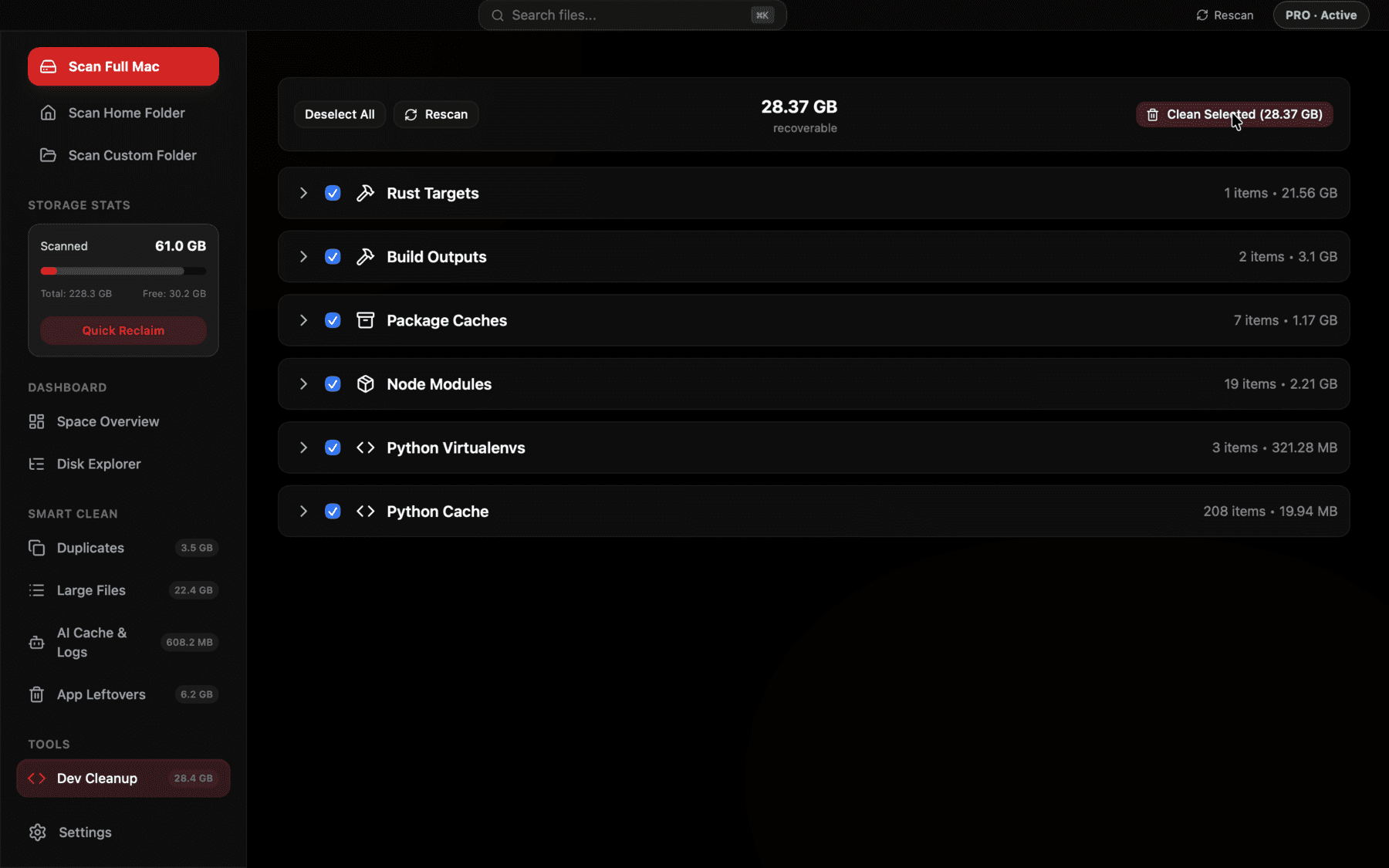
Groups every target/ directory it finds across your disk by project, with a total size, so you're deciding from one list instead of running find in a dozen folders.
How this compares to other languages
If you also work in JavaScript or Python, it's worth noting why Rust's build output feels heavier by comparison. A node_modules folder holds mostly source and pre-published package code, not compiled binaries — the size comes from the sheer number of files, not from compilation. A Python virtualenv is similar. Rust's target/ folder, by contrast, holds actual compiled machine code for every dependency, complete with debug symbols in the debug profile, which is a fundamentally heavier kind of artifact per file even before you account for how many dependencies a typical crate pulls in through transitive dependencies.
That's not a knock on Cargo — it's the tradeoff that gets you fast, predictable native binaries with no separate runtime to install. It does mean that if you're used to eyeballing a project's disk footprint by its dependency count, Rust projects will consistently run bigger than a JavaScript or Python project with a similar number of dependencies.
Don't forget ~/.cargo/registry
target/ isn't the only place Rust tooling accumulates weight. ~/.cargo/registry holds every crate source and compiled index Cargo has ever downloaded, shared across all your projects rather than duplicated per-project. Check its size with du -sh ~/.cargo/registry — it's common for this to reach a few gigabytes on a machine that's built more than a handful of Rust projects over the years.
This folder is safe to clear the same way target/ is: Cargo re-downloads whatever it needs on the next build. The cargo-cache crate (cargo install cargo-cache) gives you a cleaner way to manage it than deleting it wholesale — cargo cache -a clears everything, while more targeted flags let you keep the registry index and only clear old crate archives. Reclaim's Dev Cleanup view picks up ~/.cargo/registry alongside target/ folders too, so it shows up in the same list rather than as a separate thing you have to remember to check.
When it's not safe to clean
A couple of situations are worth knowing before you run cargo clean everywhere. If you're using a Cargo workspace where multiple crates share a single target/ directory at the workspace root, cleaning it clears build output for every crate in that workspace at once — not just the one you're working in, so the next build across the whole workspace pays the rebuild cost. And if you've set CARGO_TARGET_DIR to point multiple projects at one shared location, sizing and cleaning by project gets trickier since du -sh target/ per project no longer tells you the whole story — you'd need to check that environment variable first to know where the real target directory lives.
It's also worth pausing before running cargo clean on a project mid-build in a CI runner or a shared build server, where other processes might be reading from that target/ directory concurrently — locally on a single developer machine this basically never comes up, but it's the one scenario where "just delete it" isn't automatically the right call.
Frequently asked questions
Is it safe to delete the target folder in a Rust project?
Yes. target/ only holds compiled build artifacts that Cargo regenerates automatically the next time you build or run the project. Your source code lives elsewhere and is never touched.
How do I find every Rust target folder on my Mac?
Run find ~ -name target -type d -prune -exec du -sh {} \; 2>/dev/null from Terminal. It scans your home directory and prints the size of every target/ folder it finds without wasting time descending into them.
Does cargo clean delete my source code?
No. cargo clean only removes the target/ build output directory. Your .rs source files, Cargo.toml, and Cargo.lock are never affected.
Why is target/debug so much bigger than target/release?
Debug builds include full DWARF debug symbols and skip most optimizations, which makes individual binaries and object files noticeably larger than an equivalent release build.
Can multiple Rust projects share one target directory?
Yes, by setting the CARGO_TARGET_DIR environment variable or a build.target-dir setting in .cargo/config.toml. Cargo workspaces also share a single target/ folder across all member crates by default.
How much space does ~/.cargo/registry typically use?
It varies with how many Rust projects and dependency versions you've built over time, but multiple gigabytes is common on a machine that's compiled more than a handful of crates. It's safe to clear with cargo cache -a or by deleting it directly, since it just re-downloads on demand.
See exactly what’s using your disk space.